The Print Graveyard.
What looks perfect on a screen can look terrible on a shirt. We watched it happen across thousands of orders. Here's exactly why files fail — and how each one gets fixed.
Real failures from printers across the industry — every one credited to whoever lived it.
You absorb the cost of a second run — film, ink, and blank, all over again.
They see one bad print and they don't come back. That's the expensive part.
You can't return a printed shirt. Once it's pressed, that cost is yours.
Prints Gone Wrong.
Real files. Real reprints. Real money lost. Every one of these was preventable — one check before it shipped would have been enough.

Ink bleeding — couldn't get a smooth even texture on this print.
r/screenprinting · u/TimberTheDog
Ink is bleeding out — speedball acrylic pushing past mesh boundary on light fabric.
r/screenprinting · u/MyFatFetus
Double printing / ghosting — blurred duplicate image from layer misalignment on DTF film.
Sublistar · Tianyi Ma
Can anyone help figure out what went wrong here? Print job looked fine in the file.
r/screenprinting · u/TaBarNeLaCla
Ink bleeding defect — ink spreading beyond the design boundary after press.
Sublistar · Tianyi Ma
Jagged edges from vector — stray pixel clusters at the artwork boundary after conversion.
r/screenprinting · u/sir-thomas-pickles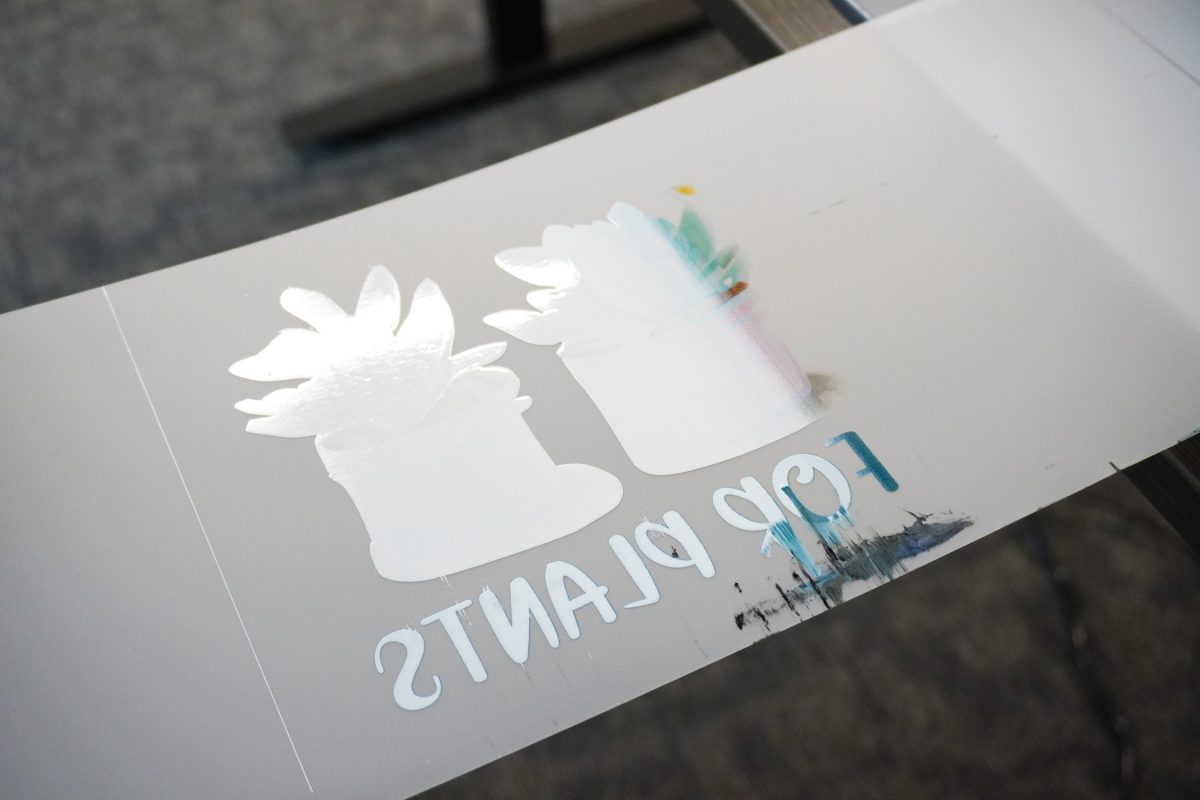
Smudged DTF print — film caught by the printhead mid-run, ink dragged across the design.
Hey Let's Make Stuff · Cori George
Colors came out dull and washed — reds pulled orange, screen colors that no printer could hit.
r/SublimationPrinting · u/sub_printer
Excess powder halo — white ring around a dark design from over-applied DTF adhesive powder.
r/heatpress · u/heatpress_op
Common DTF artwork mistakes — low-res files, white background box, sizing errors, wrong format.
Sam's DTF Transfers · Matt Hayes
Banding stripes on sublimation output — visible horizontal lines from clogged print heads.
r/SublimationPrinting · u/sub_help_pls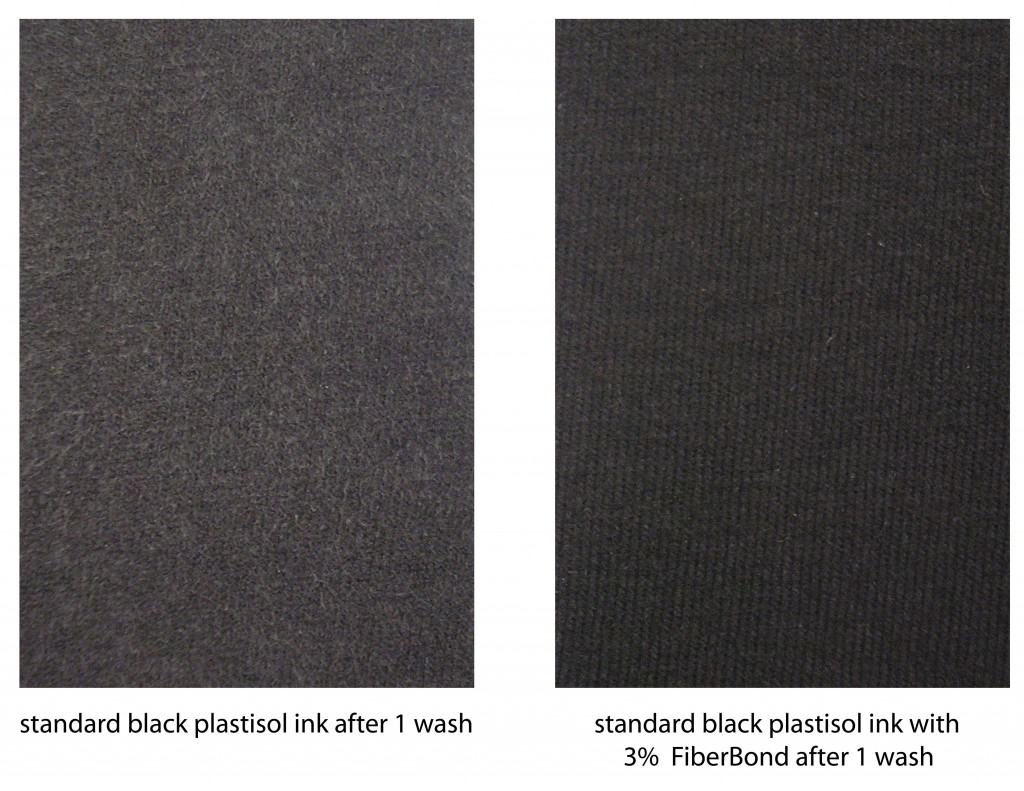
Fibrillation before/after wash — cotton fibers escaping through the ink, a fuzzy faded look.
The Ink Kitchen · Rick RothWhy is there a white ring around my design?
When a design fades out softly at the edges, the printer can't fade with it — it lays down solid white ink underneath. On a black tee, that's a dusty white halo around your art. You can't see it on screen. You can't miss it on the shirt.
The fix: We find those soft edge pixels and either snap them solid or remove them — before the file ever hits the press.
Check your edges free →

Why do my bright colors print dull?
Your screen glows. Fabric doesn't. Screens can show colors that no printer can physically put on a shirt — so that electric blue comes out looking like a rainy Tuesday. (The shop term is RGB vs. CMYK: screen colors vs. printable colors.)
The fix: We flag the colors that won't survive the press before you print, so the shirt never surprises you.
Why does my design print fuzzy when it looks fine on my phone?
A logo that looks sharp at phone size falls apart when you stretch it across a 12-inch print. There just aren't enough pixels to go around — and the file's own settings will happily lie about it. We do the honest math: your actual pixels against your actual print size.
The fix: One click rebuilds the file with real detail — sharp at the size you're actually printing.
Fix a blurry file →
Why did my smooth fade print in stripes?
Smooth on-screen fades often print as visible stripes — and on a shirt, big soft glows also land heavy and stiff. Presses like dots, not fades.
The fix: One click turns gradients into clean, print-safe halftone dots — the same trick screen printers have used for decades.


The words your printer uses, translated.
The one place on this site jargon is allowed — because we translate it on the spot.
DPI
“Dots per inch. Sharpness, basically. Too few dots for your print size and it prints blurry. Fix: Upscale.”
300 DPI
“The safe line for most prints. We compute yours from real pixels, not what the file claims.”
Raster vs. Vector
“Vector art stretches forever. Raster art (photos, PNGs) gets blocky when you blow it up. Most customer files are raster — which is why size matters.”
White underbase
“The layer of white ink printed under your design on dark fabric. Stray semi-transparent pixels get underbased too — that's the halo.”
Gang sheet
“One big sheet packed with many designs to save film. Film you don't print is money you keep.”
RGB vs. CMYK
“Screen colors vs. printable colors. Some screen colors have no printable twin — those are the ones that turn muddy.”
Every grave on this page has the same headstone: “We can't print this.”
We built PrintReady Flow so that conversation never has to happen again. Drop your file — it checks for every failure above in about 10 seconds and puts a fix next to every fail.
Your file is either print-ready or it isn't.
Upload it. Find out in 30 seconds what will go wrong — before it ships.
Upload & Find Out